CVE-2023-2600
a placeholder attribute that nobody escaped: stored XSS in Custom Base Terms
Custom Base Terms (<= 1.0.2.3) lets an admin set custom permalink bases for author, search, comments, pagination and feed. The saved value is escaped when it lands in the value= attribute, but the exact same value is echoed raw into the placeholder= attribute right next to it. Set a base to an HTML-breaking string and you get stored XSS that fires every time someone opens Settings → Permalinks.
the plugin
Custom Base Terms adds five fields to the permalink settings page. You type a word, and the plugin rewrites your author, search, comments, pagination and feed URLs to use it. example.com/author/name becomes example.com/writer/name, that kind of thing.
Five text fields that go straight into the database and come back out onto an admin page. That is the shape of a stored XSS, so I pulled version 1.0.2.3 and read the rendering code first.
the one line that matters
Every field is printed by the same loop in custom-base.php:
foreach ( $bases as $base => $nombre ) {
    echo '
    <tr>
        <th><label for="'. $base . '">' . __( ucfirst( $nombre ) ) . ' base</label></th>
        <td><input name="'. $base . '" id="'. $base . '" type="text"
            value="' . esc_attr( get_option( $base ) ) . '"
            class="regular-text code apg"
            placeholder="' . $wp_rewrite->$base . '" /> ...';
}
Look at the two attributes carefully.
value="..." runs the stored option through esc_attr(). That one is safe. Quotes and angle brackets get encoded.
placeholder="..." prints $wp_rewrite->$base with no escaping at all.
So the question becomes: is $wp_rewrite->$base attacker controlled? Because if it mirrors the value I saved, the placeholder is a free injection point sitting two attributes away from the field that was carefully escaped.
tracing the placeholder back to my input
The plugin sets the rewrite property on every page load, on the init hook:
function custom_base_terms_inicio() {
    global $wp_rewrite, $bases, $custom_slugs;

    foreach ( $bases as $base => $nombre ) {
        $custom_base       = get_option( $base );
        $wp_rewrite->$base = empty( $custom_base ) ? $wp_rewrite->$base : $custom_base;
    }
}
add_action( 'init', 'custom_base_terms_inicio' );
There it is. If the option is not empty, $wp_rewrite->search_base becomes whatever I stored, byte for byte. The placeholder is my input.
Now the save side:
foreach ( $bases as $base => $nombre ) {
    if ( isset( $_POST[$base] ) ) {
        $custom_base = $_POST[$base];
        if ( !empty( $custom_base ) ) {
            $custom_base = preg_replace( '#/+#', '/', '/' . $custom_base );
        }
        custom_base_terms_carga_base( $custom_base, $base, $nombre );
    }
}
$_POST[$base] goes in raw. No sanitize_text_field, no wp_kses, no wp_unslash. The only transform is a preg_replace that collapses runs of slashes and prepends one. That is a URL-cleanup step, not a security control. It does nothing about <, > or event handlers.
Stored XSS confirmed on paper. An admin who saves a poisoned base burns every user who later opens the permalink page.
building a payload that survives the trip
Two obstacles stand between my string and the placeholder, and both are easy to miss.
WordPress magic quotes. WordPress slashes everything in $_POST before your code sees it. The plugin reads $_POST[$base] without calling wp_unslash(), so a " is stored as \". If I try the usual "><script>, the script body gets backslashes sprayed through it and the JS dies with a syntax error. I learned that the hard way: my first attempt fired the onerror with a payload of a single lonely backslash. The trick is that a backslash is meaningless inside an HTML attribute, so \" still closes the attribute. The breakout works. It is only the quotes inside the JavaScript that get mangled. So the payload must contain no quotes of its own.
The slash collapse. preg_replace( '#/+#', '/', ... ) eats //. Any payload with a double slash gets corrupted. So no // either.
That rules out quoted strings and closing tags like <\/script> written the lazy way. The clean answer is a quote-free, slash-light payload:
"><img src=x onerror=alert(document.domain)>
onerror=alert(document.domain) needs no quotes and no spaces inside the attribute. alert(document.domain) has no string literal to slash. The breakout "> contributes the only ", which becomes \" in storage and still terminates the placeholder.
I appended a styled <div> banner so the screenshot reads clearly, and pointed the alert at document.domain so the dialog proves the origin.
reproduction
Local WordPress 6.2, plugin pinned to 1.0.2.3, logged in as admin.
Settings → Permalinks → Custom Base Terms section → Search base
Set the search base to:
"><img src=x onerror=alert(document.domain)>
Save. The page reloads, the plugin pushes my option into $wp_rewrite->search_base, the placeholder prints it raw, the broken image fires onerror, and the script runs in the wp-admin origin.
[DIALOG] type=alert message="localhost"
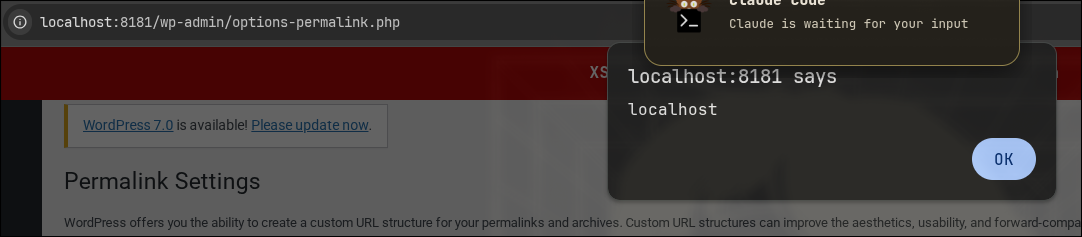
The red bar is my injected element painting over the admin chrome. The captured alert(document.domain) is the proof the JavaScript executed, not just that HTML was reflected.
impact
CVSS 4.4. It needs an authenticated admin to plant the payload, which is why the score is moderate. But “admin only” understates it on multisite and on any site where roles like editor or a custom role can reach plugin settings. The payload lives on a core settings page every administrator visits, so it is a clean stepping stone: one compromised low-trust admin session poisons the page for the real super admin, and from a super admin you have plugin-editor RCE.
the fix
1.0.3 escapes the placeholder. The correct call is the same esc_attr() already used one attribute to the left:
placeholder="' . esc_attr( $wp_rewrite->$base ) . '"
One function call. The bug was always that someone escaped the value and forgot the placeholder sitting beside it.